The “Why” Behind the Cuff: Bridging the Tech Gap
Let’s get real for a second: the tech inside the RingConn Gen 3 is mind-blowing, but it isn’t magic. When I first started testing the blood pressure beta, I was just as confused as everyone else. Why do I need to keep my old, clunky arm cuff around? And what is this “28-day” countdown all about?
After weeks of trial and error (and a few frustrated calls to support), I’ve realized that the secret isn’t in the ring alone—it’s in the setup. Think of this as your definitive blood pressure calibration guide for moving from “confused user” to “data pro.”
Why the Cuff and Ring Have to “Talk”
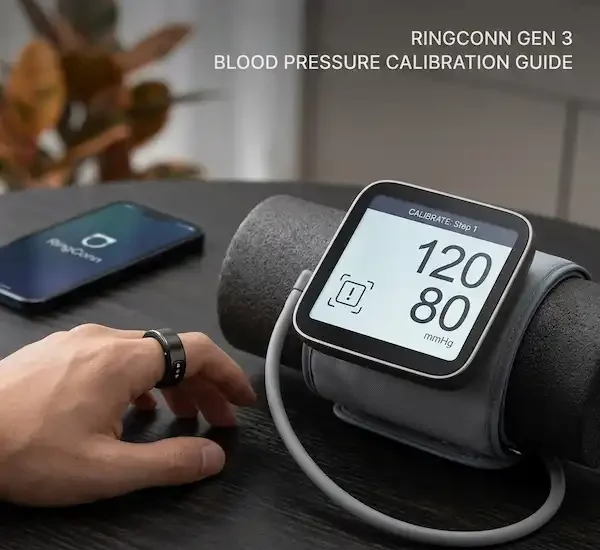
The RingConn Gen 3 uses PPG sensors—those little flashing lights—to see how your blood moves. But it doesn’t actually know your “pressure” until you tell it. It’s like a scale that needs to be “zeroed out.” The arm cuff provides the clinical truth, and the ring learns to map its light signals to those numbers.
This is why every blood pressure calibration guide emphasizes that the ring tracks trends, not absolute clinical stats. It’s a smoke detector for your heart health, not a replacement for your doctor’s office. According to the American Heart Association, home monitoring with a validated cuff is essential for accuracy, and the RingConn simply makes that data continuous.
The 28-Day Rule: A Strategy, Not a Suggestion
The app will ask you for a recalibration every 28 days. In my experience, if you skip this, the data starts to “drift.” Your body changes—maybe you lost weight, started a new medication, or the seasons changed and your fingers are slightly different sizes.
Following a strict blood pressure calibration guide schedule ensures the algorithm stays anchored to your current physiology. I personally set a calendar reminder for every fourth Sunday morning. It takes five minutes, and it keeps my trends reliable.
How to Calibrate (The “Statue” Method)
I used to fail calibration constantly because I was trying to check my email or talk to my wife while the cuff was inflating. Here is the foolproof blood pressure calibration guide for a successful sync on the first try:
- Placement: Ring on your non-dominant hand (index or middle), cuff on the opposite arm.
- Posture: Sit in a chair with back support. Feet flat on the floor—no crossing your legs!
- The “Statue” Rule: Once you hit start in the app, do not move a muscle. Don’t even talk. I’ve found that even a deep sigh can throw off the PPG sensor enough to trigger an error.
- Repeat: The app usually wants 3 or 4 readings. Don’t rush. Wait 60 seconds between each one so your blood flow returns to normal.
Troubleshooting Checklist: When Calibration Fails
We’ve all been there—the “Calibration Failed” red text is incredibly annoying. Before you give up, run through this checklist I’ve compiled from the community and my own troubleshooting sessions:
- Warm Your Hands: If your fingers are cold, the blood vessels constrict (vasoconstriction), and the ring can’t get a clear signal. Rub your hands together for a minute before starting.
- Check the Snugness: If the ring rotates too easily, it’s too big. A proper blood pressure calibration guide requires a snug fit so the sensors stay flush against the skin. If you’re between sizes, use the inner “fatty” part of the finger.
- Charge Up: Ensure both the ring and your phone are above 30%. Low power modes can sometimes stutter the Bluetooth connection during high-data transfers like calibration.
- Kill Background Apps: On both iPhone and Android, close other health apps that might be fighting for the Bluetooth “handshake.”
- Environment Check: Avoid calibrating under bright, direct sunlight or flickering fluorescent lights. The PPG sensor is light-sensitive, and “optical noise” is a real thing.
- Skin Prep: Ensure there’s no thick lotion or sunscreen on your finger. Anything that blocks the light path will lead to a failure.
Real-Life Use Cases: Where This Tech Shines
Why go through all this trouble? Because once you follow the blood pressure calibration guide and get it set, the insights are transformative.
- The “Salty Meal” Test: I noticed my “Blood Pressure Insight” bar stayed in the high-yellow zone for 12 hours after a heavy ramen dinner. It was the wake-up call I needed to watch my sodium.
- Stress Management: I can see exactly how my morning commute impacts my trends. If I see a spike, I know it’s time for a five-minute breathing exercise.
- Sleep Quality: The ring tracks you while you sleep. Most people never use a cuff at 3:00 AM, but that’s when “nighttime dipping” (or lack thereof) happens. This is an industry-level metric that used to require a hospital stay.
Industry Insider Knowledge: The “Motion Artifact” Problem
Inside the wearable world, we talk about “Motion Artifacts.” Because your finger moves more than your bicep, the ring has a hard task. This is why the blood pressure calibration guide is so strict about being still. The ring has to learn what your specific pulse wave looks like when you are resting so it can accurately subtract the “noise” when you are moving during the day.
FAQ
Q: Can I use a wrist cuff for the blood pressure calibration guide? A: You can, but it’s not recommended. Upper-arm cuffs are far more accurate baselines. If you start with a shaky baseline, the ring’s data will be shaky too.
Q: Does the app work the same on iPhone and Android? A: Mostly, yes. However, Android users should check their “Power Management” settings to ensure the app isn’t being “put to sleep” in the background, which can interrupt the 28-day tracking.
Q: I have a tattoo on my finger; will it work? A: Dark ink can block the PPG light. If you have a finger tattoo, try a different finger or hand to ensure your blood pressure calibration guide results are accurate.
Final Thoughts
The Gen 3 is a leap forward, but it’s a partnership between you and the hardware. If you take the time to treat the blood pressure calibration guide as a serious ritual once a month, you’ll get data that actually means something. If you rush it, you’re just wearing an expensive mood ring.
Stick to the “Statue” method, keep your hands warm, and respect the 28-day window. Your heart will thank you.
Additional Helpful Information
More about using a smart ring to measure blood pressure — Smart Ring Blood Pressure Tracking Guide