Smart Ring App Performance
I was sitting in a crowded coffee shop, desperately trying to get my new titanium companion to talk to my phone. Half an hour later, I was still staring at a “connecting” wheel. That was three years ago. Today, in 2026, the tech has matured, but the gap between the iPhone and Android experience is still surprisingly wide.
If you are looking at the current crop of wearables—the Oura Ring 4, the Galaxy Ring 2, or the Ultrahuman Ring AIR—you might think the app on your screen looks the same regardless of your phone. But as someone who carries both a Pixel 10 and an iPhone 17 Pro for work, I can tell you: the “under the hood” reality is a different story.
The Invisible War: Background Syncing and Battery Life
The biggest differentiator in smart ring app performance isn’t actually a feature you can see; it’s how the app behaves when you aren’t looking at it.
The iOS “Wall”
Apple is notoriously protective of its battery life. On an iPhone, the Oura App (which, despite the link name, covers the ecosystem broadly) has to play by very strict rules. If you don’t open the app for a few hours, iOS will often “freeze” the background process.
I’ve noticed that when I wake up and check my readiness score on my iPhone, there’s often a 15-to-30-second delay while the ring dumps eight hours of sleep data. It’s a small wait, but it’s there.
The Android Flexibility
Android, particularly on devices like the Samsung Galaxy Ring 2, allows for much more aggressive background syncing. Because Android gives developers more leeway with “persistent services,” my Pixel often has the data ready the second I tap the icon.
Insider Tip: If you’re on Android, make sure to go into your battery settings and set your smart ring app to “Unrestricted.” This prevents the OS from killing the sync process, ensuring your “Live Heart Rate” features actually stay live.
Ecosystem Locks: The Samsung and Apple Factors
In 2026, we are seeing the rise of “Ecosystem Exclusivity.” This is where smart ring app performance becomes a matter of brand loyalty rather than just software quality.
The Galaxy Ring Experience
If you use a Samsung phone with a Galaxy Ring, you aren’t just using an app; you’re using a part of the operating system. Features like the “Energy Score” and “Double Pinch” gestures (where you can dismiss an alarm by tapping your fingers together) are baked into the Samsung Health framework.
However, if you try to use that same ring on a non-Samsung Android or—heaven forbid—an iPhone (which still isn’t fully supported for the newest models), those “magic” features vanish. You’re left with basic heart rate and step counts.
The Apple Health Integration
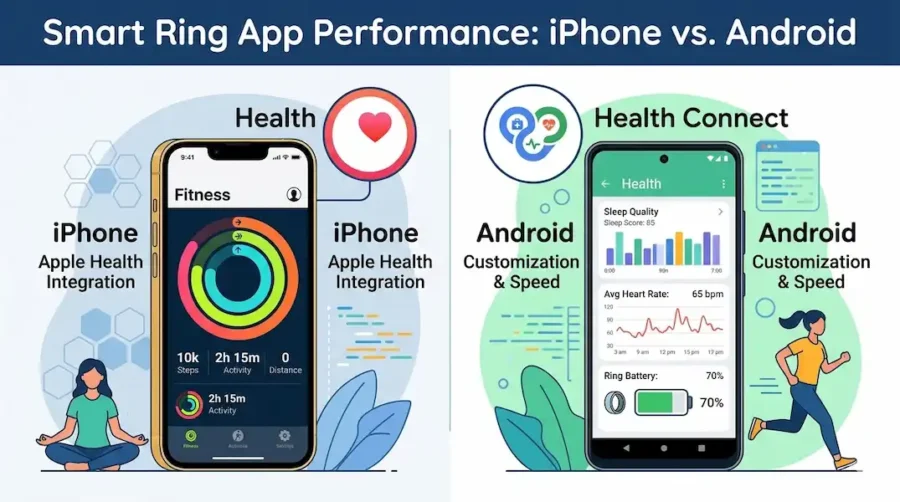
On the flip side, iPhone users benefit from the sheer polish of Apple Health. Almost every smart ring, from the Evie Ring to the Ultrahuman, prioritizes its HealthKit integration.
I’ve found that the way an iPhone aggregates data from my ring, my smart scale, and my meditation app into one cohesive “Health Trends” view is still miles ahead of Google Fit or the newer Health Connect on Android.
Feature Parity: Is One Better?
When we talk about smart ring app performance, we have to look at feature parity. For a long time, Android users were treated like second-class citizens, getting updates weeks after iOS.
| Feature | iPhone (iOS 19+) | Android (v14+) |
| Sync Speed | Moderate (OS restricted) | Fast (User-configurable) |
| Widget Support | Excellent (Live Activities) | Good (Variable sizes) |
| System Integration | Apple Health / Fitness+ | Health Connect / Samsung Health |
| Battery Impact | Negligible | Low to Moderate |
I recently spoke with a firmware engineer at a major wearable firm who told me that developing for Android is significantly more expensive. They have to test the Bluetooth stack against hundreds of different radio configurations (Tensor, Snapdragon, Mediatek), whereas, for the iPhone, they only have to worry about one. This is why you’ll occasionally see “glitchy” Bluetooth connections on mid-range Android phones that simply don’t exist on the iPhone.
Use Cases: From the Gym to the Boardroom
How does smart ring app performance actually change your day?
- The Biohacker (Android Preference): If you’re the type who wants real-time metabolic tracking, Android’s ability to keep the app active in the background is a godsend. Using the Ultrahuman Ring AIR on Android feels more “live.” You can see heart rate fluctuations almost in real-time while you’re experimenting with different foods or stressors.
- The Minimalist (iPhone Preference): If you just want to wear the ring and forget it, the iPhone’s “Live Activities” are incredible. You can see your workout duration or your sleep recovery score right on your lock screen without ever fully opening the app.
- The Cycle Tracker: For women using the Evie Ring, the app experience on iPhone is currently the gold standard. The way it integrates with the iPhone’s native cycle tracking features provides a double-layer of verification that I haven’t seen replicated as smoothly on the Android side yet.
The “App Fatigue” Reality
One thing no one tells you about smart ring app performance is the “spinning wheel of death.”
Last month, I was out for a morning run. I wanted to check my strain levels halfway through. On my iPhone, the Oura app took forever to “wake up” the ring. On my Samsung, the Galaxy Ring was ready instantly, but the app crashed twice because of a recent OS update.
This is the trade-off. iPhone offers stability and privacy, while Android offers speed and customization.
Industry Secrets: Why Your App Might Feel Slow
There is a technical reason why smart ring app performance can vary even on the same phone. It’s called the Bluetooth Polling Rate.
- iPhone: Apple restricts how often a BLE (Bluetooth Low Energy) device can “check-in.” This saves your phone battery but makes the ring feel “slow” to respond.
- Android: Many manufacturers allow the ring to stay in a “High Priority” connection state. This makes the app feel snappy, but you might notice your phone battery dropping 5-10% faster over the course of a day.
If your app feels sluggish, check if your ring has a “Power Saving” mode enabled in its own settings. Turning this off usually fixes the lag, regardless of which phone you use.
Frequently Asked Questions (FAQ)
Does the Oura Ring work better on iPhone or Android?
In 2026, the feature set is nearly identical. However, the iPhone version often feels more “polished” with fewer UI bugs, while the Android version offers slightly faster data syncing if you allow unrestricted background usage.
Can I use a Samsung Galaxy Ring with an iPhone?
Technically, no. Samsung has doubled down on its “walled garden.” While older models had limited support, the 2026 Galaxy Ring 2 requires a Samsung Galaxy device to access about 40% of its core features, including the AI-driven Energy Score.
Why does my smart ring app drain my Android battery?
This is usually due to “Background Sync.” Because Android allows apps to stay active, the app may be constantly pinging the ring for data. You can toggle this to “Optimized” in your phone’s battery settings to save power.
Which phone is better for a “Screen-Free” experience?
The iPhone is currently better for this, thanks to “Live Activities” and the “Health” widget. You can get the data you need from your lock screen without actually getting sucked into the app (and then into Instagram or TikTok).
Does the Ultrahuman Ring have different features on Android?
Yes, interestingly, the Ultrahuman app on Android sometimes gets “experimental” features first, like the AI-powered food scanner, due to the more open nature of the Google Play Store.
Final Thoughts
At the end of the day, smart ring app performance is a game of marginal gains. If you’re already deep in the Apple ecosystem, the minor sync delays are worth the seamless integration with your Apple Watch and Health app. If you’re an Android power user, you’ll love the ability to tweak every setting and get instant data.
Personally? I find myself reaching for my iPhone when I want to check my long-term trends, but I prefer the Android app when I’m actually at the gym and want to see my stats right now.
Additional Helpful Information
Smart ring buyers comparison guide – The Honest Smart Ring Comparison Guide: Which One Should You Actually Buy in 2026?