💍 The First Week of Smart Ring Calibration
Hey everyone! If you just got a smart ring—whether it’s an Oura, a sleek Ultrahuman Air, a RingConn, or you’re waiting for the Samsung Galaxy Ring—you might be staring at your first few days of data feeling a little… confused.
I remember my first week. I expected instant health Nirvana, but my app told me my Resting Heart Rate (RHR) looked like it was having an internal rave, and my Readiness Score was a persistent question mark. Seriously, the scores were all over the place!
Turns out, my ring wasn’t broken—it was just doing its job. It was in the dreaded, yet vital, Calibration Period. Think of it as your ring getting to know your body’s personal quirks, and honestly, it’s where the real magic (and sometimes the real frustration) happens.
📅 The First 7 Days: Why Your Ring Needs to Chill Out
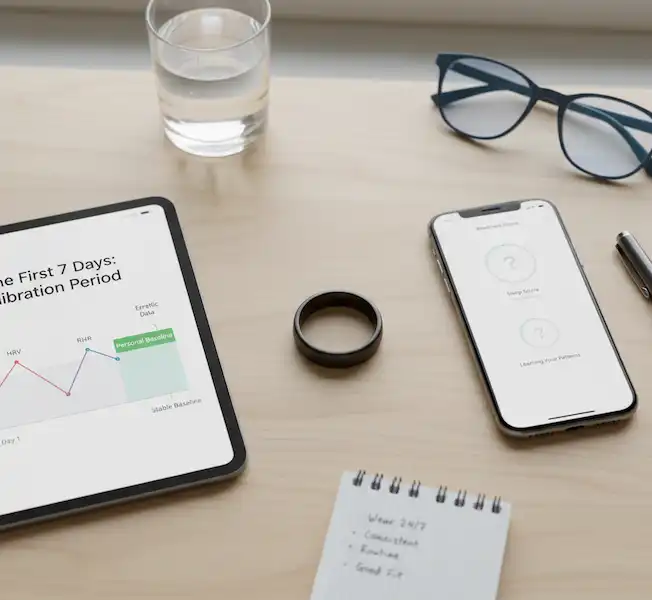
When you first slip that ring on, it’s collecting raw data. It doesn’t know your normal. It needs about a week—and often longer—to figure out what your personal Baseline is.
What the Heck is Happening Inside the App?
| The Metric That’s Acting Up | My Personal Experience | Why It’s Freaking Out |
| Resting Heart Rate (RHR) | Day 2: The app told me my RHR was 15 BPM higher than usual. I panicked and thought I was sick. | The ring is searching for the lowest stable point while you sleep. Until it finds it several times, the numbers are just trial runs. |
| HRV (Heart Rate Variability) | My “Readiness” score was stuck below 50 for three days straight. I felt fine, but the ring said I was a trainwreck! | HRV is the most sensitive metric. It needs consistent, clean data to map your nervous system’s normal range. Erratic scores are standard during this phase. |
| Sleep Stages | My Deep Sleep went from 3 hours (pre-ring expectations) to 30 minutes. I felt cheated! | It’s learning how your unique movement patterns correlate with different sleep stages. Give it time to distinguish between you rolling over and you entering REM sleep. |
My Honest Take: Don’t stress the numbers in the first week. Seriously. If your Readiness score is missing or terrible, ignore it. Focus only on consistency—wearing the ring 24/7—and fit. If the ring slides around, the data is useless garbage, period.
🛠️ The Recalibration Drama: When You Have to Start Over
So, you got sick on Day 3 of calibration, or maybe you switched your ring from your index finger to your middle finger, or—like me—you had a rogue night of too much pizza and wine that threw off the initial RHR baseline.
Sometimes, you need to hit the big red button and recalibrate. This is like telling your ring, “Forget everything you think you know about me, let’s start fresh.”
🚨 Anecdote Alert: I had to recalibrate my RingConn because I decided to wear it on a new finger three weeks in. The app suddenly accused me of sleeping terribly. I knew I needed to force a reset to clear the old finger’s baseline.
How to Force a New Baseline (Brand-Specific Steps)
Recalibration usually means doing a Factory Reset in the app. Always SYNC your ring first!
1. Oura Ring: The Full Reboot
Oura doesn’t have a “recalibrate” button—you need the full factory reset to clear the stored baseline locally.
- My Shortcut: Go to the menu ($\equiv$) > My Oura Ring (or tap the battery) > Find Factory reset.
- The Result: You’ll need to re-pair it like a brand new device, which forces the ring to restart its 7-30 day learning period. Good luck!
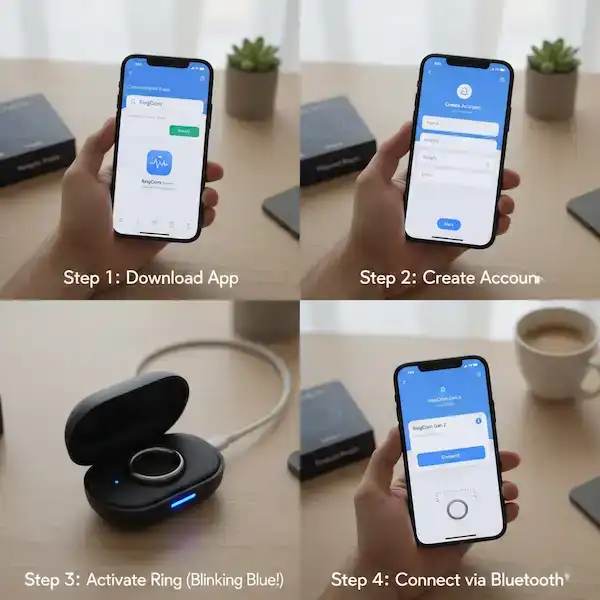
2. RingConn Smart Ring: The Charging Case Trick
RingConn keeps it slightly mysterious, often using a physical reset via the charger.
- The Process: Place the ring in the charger. Give the back of the ring a few gentle, slow taps (5–7 times) while it’s in the case. This temporarily interrupts the connection.
- Confirmation: Watch for the charging light to flash blue. If it does, you’ve reset the local firmware, and the app will start the baseline learning again.
3. Ultrahuman Ring Air: App-Based Cleanup
Ultrahuman makes it simple via the app settings.
- My Shortcut: Tap the Ring icon > Scroll to the bottom and hit Factory Reset.
- The Result: It forces a connection reset. Place it on the charger, wait for the green light, and boom—it’s Day 1 again.
4. Samsung Galaxy Ring: The Wearable App Manager
For the upcoming Galaxy Ring, we expect this to be managed entirely through the Galaxy Wearable app, just like their watches.
- The Expectation: Go into the Ring settings within the Wearable app and find the Reset option. This will clear the connection and force a fresh pairing.
💡 Quick Tips for Sanity During Calibration
If you’re dealing with the calibration blues, here’s my survival guide:
- Check the Fit (Again and Again): If the ring is loose, your data is toast. I found the middle finger gives the best, most consistent sensor contact for most people.
- Don’t Change Fingers: If you do, you need to recalibrate. Period. The data signature changes drastically between fingers.
- Wait for the Badge: If your ring shows you a Readiness/Recovery/Sleep score, that means it thinks it has a reliable baseline. Until then, the number is just a helpful suggestion, not gospel truth.
- Listen to Your Body First: If your ring says your readiness is 55, but you feel fantastic and energized, trust your gut (and your body). The ring is a guide, not a dictator.
❓ Smart Ring Calibration FAQ
Q: Why is my Readiness/Sleep Score inaccurate after a few days?
A: It’s likely because the initial calibration period is not complete. Your ring needs multiple nights of data to calculate a reliable physiological baseline for metrics like your deep sleep average, RHR, and HRV. Wait for the recommended 7-30 days before assessing accuracy.
Q: Does switching fingers require recalibration?
A: Yes. While the fit might be the same size, your finger’s skin thickness, blood flow, and sensor contact quality are unique to each location. For consistent data, try to wear the ring on the same finger (index, middle, or ring finger are best) consistently.
Q: Can a poor fit affect my calibration?
A: Absolutely. A loose ring allows for movement, which can cause artifacts (noise) in the PPG sensor data (for HR and HRV) and temperature readings, leading to a wildly inaccurate baseline.16 Ensure your ring is snug—you should be able to spin it slightly with effort, but it shouldn’t rotate freely on its own.
Additional Helpful Links
- Here are details on how to setup your smart ring – How to setup your Smart Ring – Getting Started
🔗 External Authoritative Sources
For detailed technical specifications and health monitoring validation:
- Meta-Analysis on Smart Ring Use: The Use of Smart Rings in Health Monitoring—A Meta-Analysis (MDPI)
- Oura Ring:
- Setup and Baseline Data: Set Up an Oura Ring
- Factory Reset/Troubleshooting: Factory Reset an Oura Ring
- Ultrahuman Ring Air:
- Official FAQs (Calibration Duration): Ultrahuman Ring Air FAQs (Note: The official FAQ specifies a 7-day calibration period.)
- RingConn Smart Ring:
- User Guide & Setup Instructions: RingConn Gen 2 Quick Guide
- Samsung Galaxy Ring:
- Galaxy Wearable Application Support: Galaxy Wearable (Samsung Support) (The central hub for managing the ring’s settings and pairing.)