A Guide to Smart Ring Maintenance, Charging, Cleaning, and Care
When I first slipped my smart ring onto my finger, it felt like a piece of the future. No screen, no buzzing on my wrist—just a sleek band that somehow knew my heart rate and sleep cycles. But after a few months, reality set in. I realized that if I didn’t treat this tiny computer with a bit of Smart Ring Maintenance, that “future” was going to end up as a dead piece of titanium in my bedside drawer.
Between the battery anxiety of a long weekend trip and the realization that hand lotion is basically “sensor kryptonite,” I’ve learned the hard way how to keep these things running. If you want your ring to last more than a year without its battery life falling off a cliff, here is the unvarnished truth on how to live with it.
The “Shower Trick” and the Art of Charging
The biggest mistake I made early on was treating my ring like my phone—charging it to 100% every night. Most smart rings use lithium-polymer batteries, and they are happiest when they stay between 30% and 80% charge. Pushing them to 100% or letting them die completely puts a lot of chemical stress on those tiny cells.
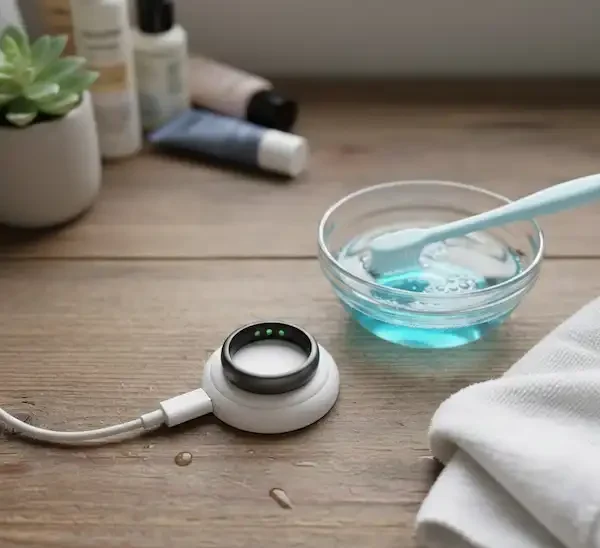
My Personal Routine: I’ve found the “shower top-off” is the holy grail of smart ring maintenance. I keep my charger on my bathroom vanity. Every morning, while I’m showering and doing my skincare routine (about 15-20 minutes), the ring sits on the dock. By the time I’m dressed, it’s usually gained 15-20%, which is exactly what it used to lose over the previous 24 hours. This keeps the battery in that “sweet spot” without me ever having to think about it.
Pro-Tips for a Better Charge:
- Stick to the Original: I once tried using a high-powered MacBook charger on my ring dock because it was closer. The ring got worryingly hot. Always use the manufacturer’s cable and a low-wattage wall brick. According to Battery University, heat is the #1 killer of battery longevity.
- The Travel Hack: If you’re going on a trip, don’t just toss the ring in your bag. If it’s not on your finger, put it in “Power Saving Mode” or “Airplane Mode” via the app. This prevents it from fruitlessly searching for a Bluetooth connection for three days and draining itself to zero.
Getting the Most Out of Every Percent
We’ve all seen the marketing claims: “Lasts up to 7 days!” In my experience, that’s usually only true if you’re a monk who doesn’t move. If you’re active, expect closer to 4 or 5. Important Smart Ring Maintenance will help with the battery life.
However, you can stretch that life significantly by being smart with your features. For instance, SpO2 (blood oxygen) monitoring is a massive battery hog. I found that unless I’m worried about sleep apnea or altitude, I don’t really need it running every single night. Turning it off can easily add an extra day to my charge.
Another drain? Live heart rate tracking. I used to leave the app open on my phone to “watch” my heart rate during workouts. Bad move. It keeps the Bluetooth radio pinned at max power. Now, I let the ring record the data locally and sync it afterward. Your phone battery—and your ring—will thank you.
The Gross Truth: Cleaning Your Sensors
Let’s be real: skin cells, sweat, and hand cream build up under that ring. I noticed about six months in that my “Sleep Scores” were getting wonky. The data looked like a mountain range instead of smooth curves.
I took the ring off and looked at the underside. The three little sensor bumps were covered in a film of soap residue and lotion.
How to do Maintenance Without Ruining It
You don’t need fancy jewelry cleaner. In fact, Samsung’s official guidance warns against harsh chemicals or ultrasonic cleaners, which can vibrate the delicate internals to death. Follow these key step to aid in your Smart Ring Maintenance.
- The Weekly Deep Clean: Once a week, I drop my ring into a small bowl of warm water with a single drop of mild dish soap (the kind you’d use for glasses). I let it soak for two minutes, then use a very soft-bristled baby toothbrush to gently scrub the sensors.
- The “Hand Wash” Method: Whenever you wash your hands, make sure you move the ring around. Soap trapped under the band can cause “ring rash” (irritant dermatitis) and also gunk up the sensors.
- The Microfiber Wipe: Every time I take it off to charge, I give the inner sensors a quick wipe with a clean microfiber cloth. It takes three seconds and ensures the LEDs have a clear “view” of my skin.
When Things Go Wrong (Troubleshooting)
If your ring suddenly stops charging, don’t panic. Before you call support, try these Smart Ring Maintenance things:
- Clean the contacts: Take a toothpick or a dry Q-tip and gently clean the gold charging points on the ring and the pins on the dock. Even a tiny bit of skin oil can break the connection.
- The “Paperclip” Reset: Most docks have a tiny reset hole or a specific “tap pattern” to reboot the hardware. Check your manual—sometimes the ring just needs a “brain transplant” to start talking to the charger again.
- Check the Alignment: Some rings (like the Oura or RingConn) need to be oriented a specific way on the charger. If the LED on the dock is blinking red, it’s usually just misaligned.
FAQ – Smart Ring Maintenance
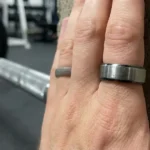
Can I wear my smart ring while lifting weights? I wouldn’t. Not because of the electronics, but because of “degloving” risks and scratches. Metal-on-metal friction will destroy the finish of your ring and can actually hurt your finger if the bar slips.
Is it okay to wear the ring in a sauna? Technically, most are rated for it, but I avoid it. High heat causes the battery to degrade much faster. If you’re a daily sauna-goer, leave the ring in your locker.
Should I charge it to 100% before a long flight? Yes, for one-off situations like travel, it’s fine to hit 100%. The “30-80% rule” is for daily habits. One full charge won’t kill it, but doing it every day for a year will.
My ring is getting hot while charging. Is that normal? Slight warmth is normal. “Hot to the touch” is not. If it’s uncomfortable to hold, unplug it immediately—this usually indicates a faulty cable or a failing battery cell.
Additional Helpful Links
Use your smart ring for fitness tracking – Smart Ring Fitness Tracker: The Essential Guide